So what can you do?
If the apps are mission-critical, just don’t update to iOS 11. Look at the developer’s site and social media to see if a change is expected.
If you don’t care, you might still wait to upgrade your older devices. Upgrades can sometimes play havoc with older hardware. Wait for others to either give the all-clear or serve as a cautionary example.
The future plods on inexorably, but you can at least be ready for the consequences. Good luck!
]]>However, this change does adversely affect the iPhone-based music makers. Bluetooth simply introduces too much latency into the workflow to make wireless headphones effective. Doesn’t matter if you buy the new AirBuds or use your favorite third-party model (and you should, ’cause Apple doesn’t have a great history with headphones). If I notice the noise of a bone-crunching Madden hit well after the play occurred visually, the response of my Minim pad will definitely not cut it. And if you use the adapter to connect your favorite headphones, you have to hope your battery is fully charged. The headphones just took your power jack! The music apps I’ve used don’t seem to drain power the same way the aforementioned bone-crunching hits do, but it’s still going to impact power usage. At this point, I’m obliged to remind you to put your phone in airplane mode for more intensive musical pursuits.
To be fair, the iPhone probably isn’t your primary music platform, and if it is, grab an iPhone 6S+ while you can. The headphone jack removal isn’t too big of a deal, but it will make mobile music creation a little more inconvenient. iOS remains the best option for mobile music making, though, so it’s an inevitable inconvenience.
]]>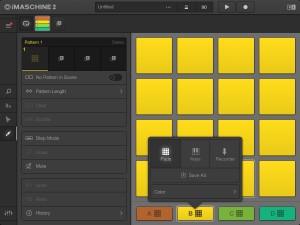
Well, kind of. When I first bought the app, the sound wouldn’t come out of my iTrack dock without routing it through Audiobus. An update added this capability, but it didn’t support background audio. Again, the addition to Audiobus solved the issue, but it’s still introducing the possibility of latency that I shouldn’t have to deal with. And the update didn’t add MIDI support either, so I’d recommend using the step recording feature because tapping the screen isn’t always the easiest way to play along with recordings. So while iMaschine 2 makes a handy app for programming full tracks, it still deals with some hampered functionality and a lack of basic MIDI functionality
]]>As shown in the feature image for this article, the update adds multi-track recording to the app. While this feature may not appeal to those who just play a single instrument at a time (or those who only use software instruments), the possibilities for using GarageBand as anything more than a sketchpad for Logic or the Mac-based GarageBand become a little more clear:
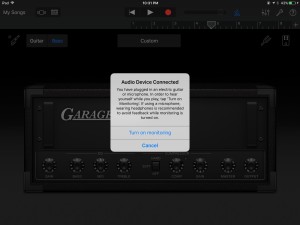
The bass amps that came with it make the app a little more appealing to me as well. Before, GarageBand’s simulated amps left quite a lot to be desired. They’re still not up to the standards of more fully featured simulators like Bias FX (no real bass-specific effects, either), but they’re better. They’re also more inline with offerings from Logic Pro.
The really fun part comes in the Live Loops section, which brings basic Ableton Live functionality to GarageBand. Things like individual loops, synced start and stop, and scene-like capability all come standard in this update:
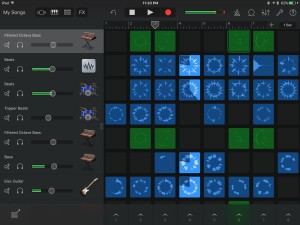
Again, not as full-featured as the Mac-based counterparts you could take advantage of, but the fact that this comes standard as part of the app makes it particularly compelling. Apple offers the standard loops you’d expect and parcels them out in genre-specific packages like EDM and Hip-Hop, but you can also record or load your own loops, samples, and even songs (obviously targeting budding DJs). An included FX window inserts common dance-oriented effects like filter sweeps, stutters, repeats, and scratching as live touch options. Just swipe across the effect to activate it. These effects work with the loops or any other recorded audio, so I had stutters, reverses, and other effects working on my bass playing in real-time at a touch of the iPad screen. The only thing I miss is immediate MIDI access to these controls (still researching at this point, but I’d love to get my Guitar Wing working with this).
The Virtual Drummer addition (one of my favorite Logic Pro features) also brings a ton of value to GarageBand – use similar settings to the Mac-based counterpart to add drum tracks that range from simple to intricate rock, trap, hip-hop, EDM, and more types of beats. You don’t get a ton of flexibility and sample control, but you get a decent start to demo or write songs.
These changes obviously bring the GarageBand app more in line with the features offered by the computer-based Logic Pro and GarageBand apps, but the iOS part of the family just became a more independent member of the group. GarageBand moves from a simple recording sketchpad to a decent live performance tool for instrumentalists, DJs, and all manner of musicians in-between. Not bad for a free app.
]]>The sound is indeed good, but I’m a little tweaked by the user experience. I found it a little easier to start pedal configurations in JamUp than in Bias FX, where I have to start with an existing preset and modify it from there. And speaking strictly from a bassist standpoint, there’s only one bass model in the app – a GK 800 clone. That said, the integration with Bias Amp allows you to import a bunch of different bass amps, and I don’t really use the amp simulators all that much. I’d rather run the pedals into my existing amp and go from there.
The effects in Bias FX do sound good, but the choices are limited at this point. The inclusion of several different compressor varieties helped, but other than that I couldn’t find any bass-specific effects. I didn’t lose too much tone using the standard effects, though. And the preset setup does map perfectly to an existing toggle patch on my SoftStep. But Bias FX carries over an existing gripe of mine from JamUp – you can turn pedals on and off in types (such as reverb or modulation) but not single instances. I don’t often need multiple drive pedals on at the same time, so this requires me to create separate presets with separate types of pedals.
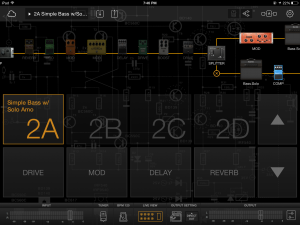
Preset Layout in Bias FX
I’m sure more updates are on the way, and the sound is good. There’s just a long way to go to please bassists’ usage here.
]]>ScoreCloud presents an easy way into making sheet music – just sing or play into the mobile device, and the app takes what you do and tries to convert it into standard notation. This process includes interpreting a key signature, tones, and duration – everything you’d expect out of standard notation. The conversion process isn’t too bad, but you should plan on making some edits post-recording. ScoreCloud won’t get everything right the first time, although it will give you some helpful hints if it notices something is wrong (like my television in the background). And those edits will probably take place on the desktop/laptop component of ScoreCloud, where you can move notes around, put in chords, and changes voices for the instruments you’re scoring out.
And, because everything requires cloud support these days, you can access your files either at home or while mobile using the app. ScoreCloud’s cloud storage seems free for now, but that could obviously change. The access remains a handy feature, though, and all changes sync fairly quickly.
ScoreCloud won’t replace full-featured notation editors right now, but you do get handy sync and note-taking options. And the singing function is a nice feature.
]]>Despite Belew’s stringed leanings, you can route more than guitars through FLUX:FX. a The app accepts audio from other apps via Audiobus, connected instruments via whichever jack and interface you wish to choose, and any connected mics (although it does mute the internal mic to prevent feedback). From there, you see the performance screen of FLUX:FX:
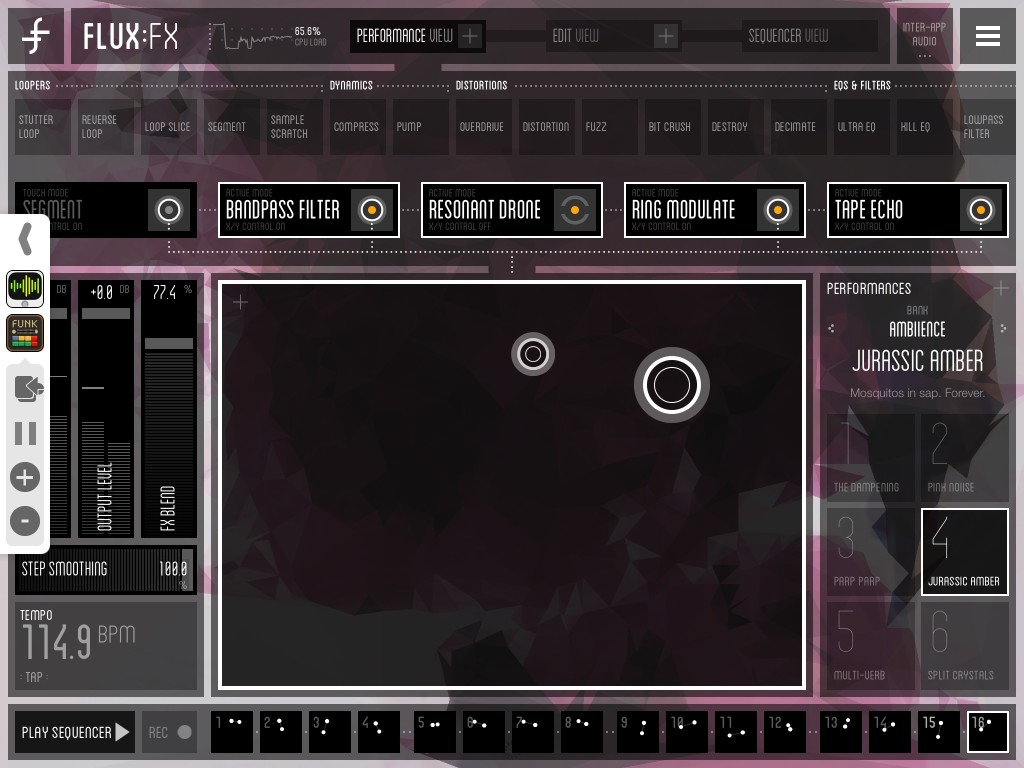
FLUX:FX Performance Screen
This screen accepts up to five effects (divided into different categories by function, like modulation, delays, and so on). Just drag the effects you want to use into the slots to activate them. You can also connect the effects to the x/y pad for live manipulation. The x/y implementation is handy – you can choose to only enable the effect when you touch the pad, or let the pad modify the sound continuously wherever you leave the control. A built-in 16-step sequencer automates the pad movement to give you hands-free manipulation while you play.
From this screen, you can also determine the amount of wet and dry signal you mix in, which can be handy for bassists who need to maintain some foundation in the tone without going too crazy. However, should you need some more precise control, tap over to the Edit screen to fine-tune the effects. The user interface does a great job of shifting around to accommodate whatever view you might need to use at the time, and the controls give you a full range of options to tweak to your heart’s content. FLUX:FX also includes a bunch of presents to try out and modify, including a few from Belew.
The manual includes MIDI information you can use to send messages for control, such as tap tempo for the sequencer and effects shifts. I had no problem syncing FLUX:FX with a drum machine app’s clock out to get the effects at the same tempo as the drumbeat, although the sequencer did not return to the first step on starts and stops. Keep that in mind as you plot your recording or live manipulations.
Overall, this app gives you a solid audio processing experience. FLUX:FX regularly topped 60% CPU usage and did give me the occasional dropout, so I wouldn’t recommend running too many high-demand apps at the same time. I did not disable the animation that goes along with the app, though, and the option to do so will give your processor a little more breathing room. As weird at he sounds get, though, the glitch may just fit right in. FLUX:FX gets deep into sound manipulation for just about any source you can throw at it, and the real-time controls make it a unique and valuable tool.
]]>Seriously, though, I couldn’t be more pleased with the way this whole project turned out, and that I managed to tackle the vast majority of apps that I wanted to. Some apps that I’m enthused about either came out or received major updates between the time I finished the book and when it published, so I’ll include some app reviews and updates in this blog as time goes on. In the meantime, though, musicians looking to include their iOS device in their musical activities should jump on this book as soon as possible.
Because really, this device made my gigging and musical life so much easier. In a single device, I can carry my instantly reconfigurable pedalboard and sheet music source, plus any number of synths and drum machines and loopers I want to carry around. It’s almost like a new brain, and I get to fascinate/annoy my fellow musicians at the same time with all the new noise. Everybody wins!
]]>Like most For Dummies books, the title pretty much tells it all – this books shows musicians how to integrate their iPhone or iPad into their music-making process (beyond taking a bunch of on-gig selfies – why am I seeing so many of these recently?). Using your iOS device as a virtual synthesizer, guitar rig, recording studio, far-out freaky noise-making machine – it’s all in there.
And the best part was playing with these toys as I was writing it. So many apps making so many beautiful noises!
So now I’m waiting for the author review process, where we go back over all the copy Mike and I contributed and make sure it actually makes sense, then send it off for the magic printing/e-book process. Look for the final publishing date early next year (pre-order for the holiday season, maybe?).
I’ll talk more about the book as it gets closer to the publishing date. Quite frankly, I’m a little done with extended writing for a bit (the book tops out just over 400 pages).
In the most pressing update, though, I once again discovered the #sitarfunkfail hashtag, thanks to some Twitter policy changes. That, my friends, is a modern miracle.
]]>